The 2 GB Zip Nobody Asked For
On sending someone your code, and the surprising amount of stuff that tries to come along with it.
A note before we start: I'm part of Technocrux, the small team behind CodeZipper. This isn't a pitch. It's the story of a problem we kept running into, and what it's like to use the thing we built to fix it.
Someone asks for the project. A contractor starting Monday, a client who wants the source, a friend who offered to look at the bug you can't find.
Right-click, Send to, Compressed folder. You go and make tea.
When you come back, Windows is still counting. Eleven minutes later you have a 1.9 GB zip, and you already know what's in it: node_modules, bin, obj, a .venv nobody needs, a Rust target folder the size of a film, and 1.1 MB of .git history you didn't mean to hand over. The actual code, the part they asked for, is about ninety kilobytes.
So you delete the zip and do it by hand. Copy the folder somewhere else, delete the heavy directories, remember there's another node_modules inside web/, zip it again. It works. It also takes twenty minutes, and there's a quiet thought at the back of your head the whole time: the rules for this are already written down. They're in .gitignore. Why am I doing this with a mouse?
Starting from the other end
CodeZipper opens on a list of projects rather than a file picker, which sounds trivial until you notice you archive the same four repos over and over. Each one shows the stacks it found the last time it looked.
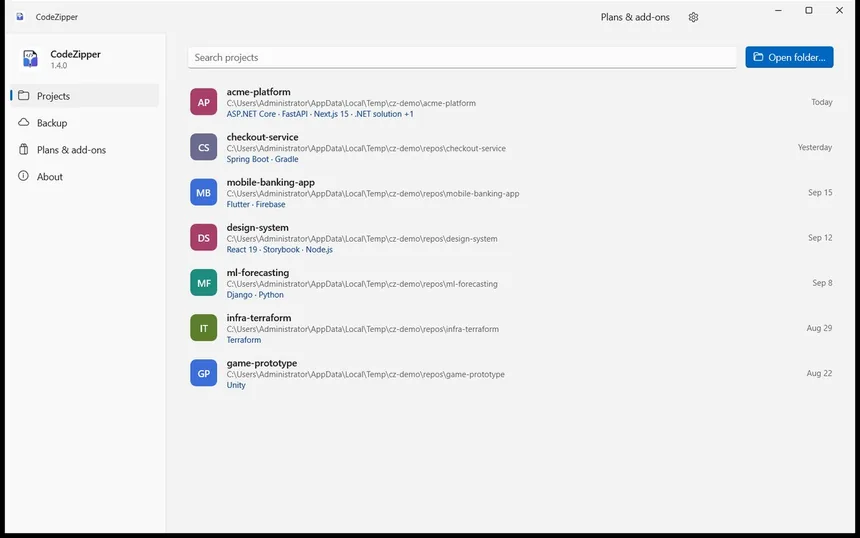
Point it at a folder and it starts reading. Every .gitignore in the tree, not just the one at the root, because a monorepo has several and they don't agree with each other. Then it looks for the markers that tell it what kind of project each sub-folder is: a package.json here, a Cargo.toml there, a pyproject.toml in the folder next door. Each set of rules applies only to its own subtree, so the Rust rules don't wander into your Next.js app.
The tree fills in while it scans. You don't wait for a spinner to finish before you can see anything.
The part I didn't expect to care about
What changed the job for me wasn't the exclusions. It was being shown them.
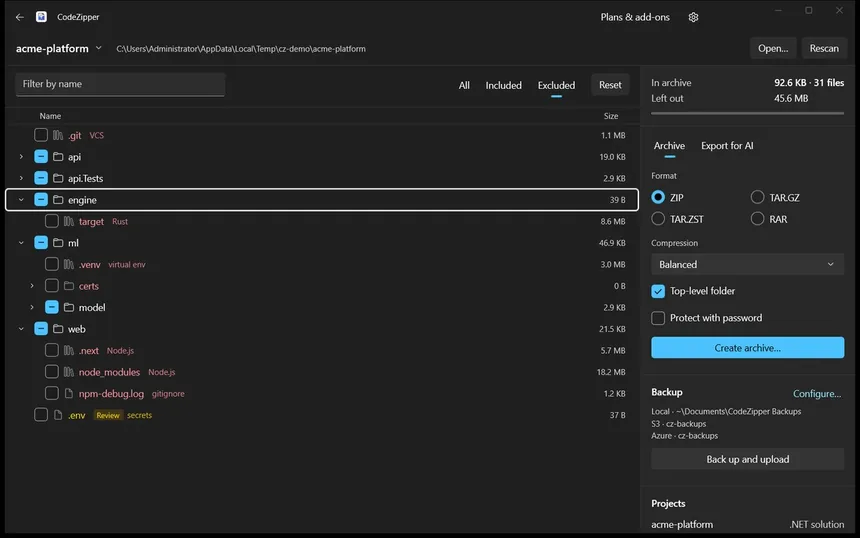
target · Rust. .venv · virtual env. node_modules · Node.js. npm-debug.log · gitignore.Red means it's gone, and next to it is the reason: the profile that matched, or the word gitignore when it was your own rule that did it. Amber means look at this before you decide — that's the Review badge on .env, and on stray keys and logs.
Up in the corner, two numbers that settle the argument: 92.6 KB in the archive, 45.6 MB left out. Untick something and both move. Tick a folder that was pruned and it means "everything underneath it", which is occasionally exactly what you want and normally not.
Then a format — ZIP if they're on Windows and will double-click it, TAR.GZ if it's going to a Linux box, TAR.ZST if you care about the size, RAR if you already have WinRAR installed — and it's written. Seconds, not minutes. There's no 7z, and that's deliberate rather than an oversight we're hoping you won't notice.
Handing code to a machine instead
Half the time these days the recipient isn't a person. You want to paste a codebase into an AI assistant, and the tool you've got is Ctrl+C, forty times.
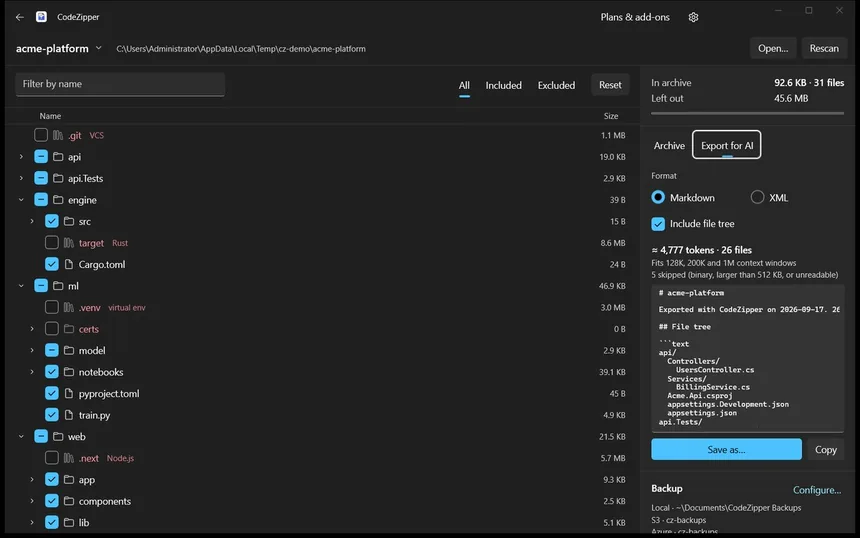
The Export for AI tab takes whatever is ticked in the tree and turns it into a single Markdown or XML document, optionally with the file tree at the top so the model knows the shape of what it's reading. The token count updates as you tick and untick, with a note about whether it fits a 128K, 200K or 1M context window. Binary files and anything over 512 KB are skipped and counted, so you know what didn't make it.
Save it, or copy it straight to the clipboard.
The thing you find out too late
You have sent a key to someone. Everyone has. It's in a config file you forgot was tracked, or an appsettings.Development.json that seemed harmless in 2023.
CodeZipper checks before the archive is written, and before an AI export leaves the app.
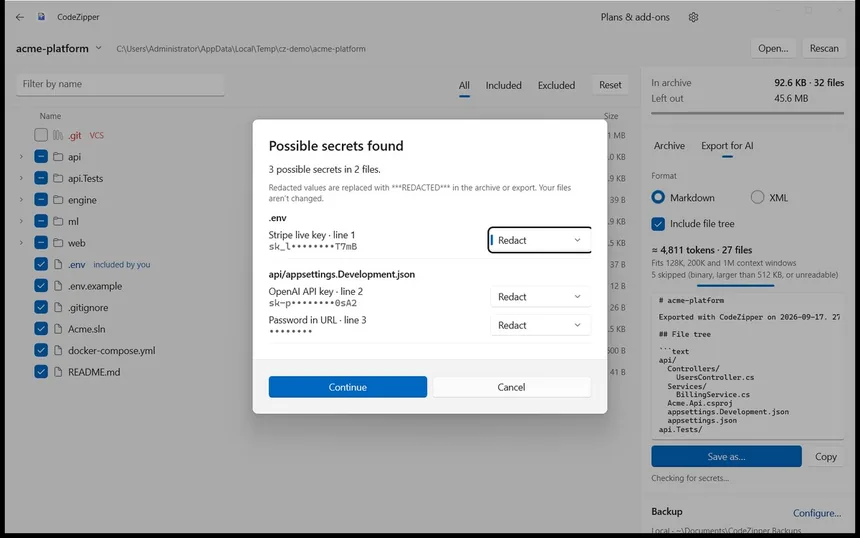
Each finding shows a masked preview and where it lives, and you decide per item: redact it, or leave it because it's a placeholder you know about. Redacting replaces the value with ***REDACTED*** inside the archive. Your files on disk aren't touched — worth saying twice, because that's the fear the first time you click it. The rules come from gitleaks, which is MIT-licensed and credited in the repo, and the app never stores or logs the secret itself, only a mask and a position.
If the archive itself needs to be sealed, ZIP and RAR take a password with AES-256. 7-Zip and WinRAR will open those; Explorer won't, which is the honest trade.
And the copy you keep
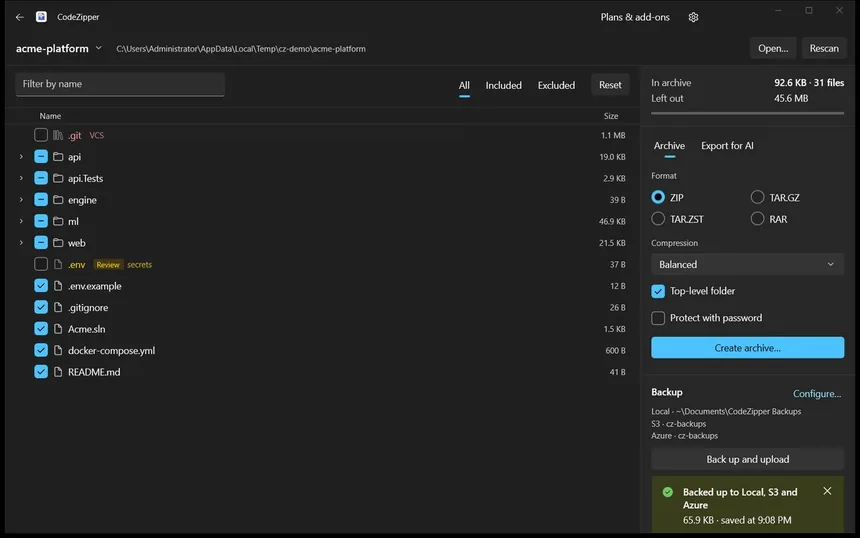
Back up writes a timestamped archive to a local folder first, and only then uploads — to Amazon S3, to anything S3-compatible (R2, B2, Wasabi, MinIO), or to Azure Blob Storage. If one upload fails the others still run, and you keep the local file regardless. Your keys go into the Windows Credential Locker, not into a settings file, and the error messages are scrubbed so a failed upload can't print half a secret back at you.
What it isn't
CodeZipper isn't a backup service; it writes to storage you already own and rent. It isn't a git client, and it won't rewrite your history. RAR needs your own copy of WinRAR, because the format isn't ours to ship. There's no 7z. TAR archives can't be password-protected, so if you need a password, it's ZIP or RAR.
And it's paid: $1.99 once, after a seven-day trial that unlocks everything. The specialised parts are one-time add-ons rather than a subscription — Stack Pack for 30-odd more ecosystems, AI Export, Security, Cloud Backup at $1.99–$2.99 each, or $7.99 for all four. Owning the app is owning it; nothing expires.
Back to the person waiting for the folder
That contractor starting Monday still just wants the code. Not your build output, not your virtual environment, and definitely not your Stripe key.
Ninety kilobytes, in about the time it takes to read this paragraph, and you saw every file that went in before it was written.
That was the whole idea: a zip that already knows what .gitignore knows.
CodeZipper is on the Microsoft Store for Windows 10 (1809) and later, on x64 and Arm64, in six languages, with a seven-day trial.